Construction finance software is now more of a buying phrase than a defined software category. Vendors use it because it ranks. Buyers use it because they are looking for a practical way to improve one or more construction finance or commercial control workflows. That mismatch is why the same search can return a dozen different construction software types.
You’ll find anything from cloud accounting platforms with CIS modules, job costing add-ons for Sage or Xero, procurement workflow tools, billing platforms for applications for payment, construction cost management systems with CVR capability, project management suites with a finance tab, and six-figure ERP implementations.
While all of these can appear under the construction finance software umbrella, each sits in its own subcategory and is built to solve a different finance or commercial control need: accounting, actual cost tracking, commitment control, applications for payment, consolidation, project delivery, or margin forecasting.
Table of Contents
With so many options on the market, buyer confusion is predictable. For many contractors, it starts when their current cost control setup can no longer carry the live commercial position across projects — whether that setup is Excel, an accounting add-on, or a construction-native tool.
The market is organised around popular search categories, but the real question is: how do you, as a contractor, find the right solution for your specific finance or cost control need?
Searching for “best project controls software”, “best construction accounting software”, or simply “construction estimating software UK” is one route. Asking a generative AI tool to recommend a vendor is another. Both return results. The challenge is choosing between those results, because vendors often use the same labels for different workflows, or different labels for the same workflow. The same tool can also be positioned across multiple software types.
Many SaaS platforms offer catch-all solutions, but their depth can be uneven: strong in accounting but light in forecasting; strong in project management but weak in CVR; strong in procurement but limited in applications for payment. Some are too complex to run, or require too much onboarding and administration for the workflow that actually needs fixing. Others are too expensive for the size of the problem.
Search results can easily send a contractor towards:
- Job costing software when the real need is forecast final cost
- Construction ERP software when the real need is better CVR discipline
- Accounting software for builders when the real need is live commitment control
- Purchase order tools when the real need is package-level commercial control
- Construction project management software with finance modules when the real need is Cost Value Reconciliation (CVR) and commercial cost control
- Billing software when the real need is applications for payment, valuations, and payment notices
- Estimating software when the real need starts after contract award
These are not bad solutions. They are just answers to different construction finance and cost control needs. While market research helps, category-led search is often not enough when the categories themselves overlap.
That is why this piece is structured as a diagnostic guide: to help main contractors and their teams identify where their finance or cost control need actually sits — accounting, ERP, budgeting, job costing, procurement, billing and applications for payment, project management, or construction cost management — and whether the right next step is a new tool, a better-configured existing system, or no new software at all.
The article starts with category definitions, then moves into diagnostic sections that help identify which workflow is actually under pressure, whether your current setup can own it, and whether a dedicated cost management layer is justified.
Read also: Managing Costs Across the UK Construction Lifecycle: Risk, Contingency and Stage-Based Cost Control
1. The Main Software Types That Appear Under Construction Finance Software
Each category below is defined by its primary purpose, so the comparison stays focused on what the software is actually meant to manage.
1.1 Construction Accounting Software
Construction accounting software manages posted financial transactions: ledger, VAT, CIS deductions and statements, retention held from subcontractors and retention withheld by clients, payroll links, management accounts, statutory reporting, and project-level accounting. It is the system finance teams use to close the books.
For UK contractors, a search for “construction accounting software UK” is usually a search for systems that support CIS, VAT, retention, HMRC reporting requirements, and project-level accounting. The results may include products such as Sage 50/200, Xero with construction add-ons, Eque2 Construct, or sector-specific systems such as RedSky and Integrity.
The limitation appears when contractors expect accounting software to deliver live commercial control. Accounting systems record what has happened. They do not naturally surface what has been committed but not yet invoiced, which variations are pending, approved, disputed, or still to be valued, or where the project will land if current trends continue. That is a different workflow with a different data shape.
1.2 Construction ERP Software
Construction ERP is the operational backbone of a larger or more complex contracting business. It typically covers finance, procurement, plant and asset management, HR, payroll, project accounting, and multi-entity consolidation. Systems such as COINS, Causeway, IFS Cloud, Microsoft Dynamics 365 with construction extensions, and Oracle JD Edwards sit in this tier. ERP is usually justified by business complexity, not by the need for better cost reports alone. Implementation is often measured in months rather than weeks, and the total cost can move quickly once consultancy, configuration, migration, and training are included.
ERP is misunderstood when contractors expect it, by itself, to fix CVRs. The discipline ERP enforces is real, but the actual mechanics of live commercial control on a subcontract-heavy project — package-level forecast revision, daily commitment exposure, and variations that are instructed, pending, disputed, or still to be valued — often still happen in spreadsheets alongside the ERP. The ERP may not be wrong for the business. It may still be too heavy, too broad, or too difficult to adapt to that specific workflow.
1.3 Job Costing Software and Construction Budgeting Software
While sometimes used interchangeably, job costing software and budgeting software serve a closely connected sequence. Budgeting software sets the original cost baseline. Job costing software then allocates posted actual costs to projects, cost codes, or packages. It tracks actuals against the baseline so the contractor can see whether posted costs are staying within the original budget structure. Together, the two give finance and commercial teams a budget-versus-actuals view.
This budget-versus-actuals layer is often what contractors add when a finance team needs project-level visibility on actuals. Sage configurations with project costing, Eque2, and the project costing modules of Microsoft Dynamics can all support this budget-versus-actuals workflow.
The misunderstanding can arise when budgeting and job costing are treated as the same thing as cost management. Neither necessarily manages live committed exposure or forecast final cost. Budgeting software answers “what was the cost baseline?” Job costing software answers “how are posted costs tracking against the budget?” Cost management software answers “where will the money end up?”
Budgeting and job costing rely mainly on baseline budgets and posted actuals. Cost management requires committed-but-not-invoiced exposure, forecast revision logic, and a live link between subcontract status and forecast final cost. Each question depends on different data.
1.4 Construction Procurement, Purchase Order, and Subcontractor Management Software
This category covers the workflows around supplier selection, subcontractor management, purchase order control, subcontract awards, package approvals, supplier compliance, insurance documentation, requests for quotation (RFQs), pre-qualification status, and commitment registers.
- Procurement software manages the buying workflow: package tendering, supplier selection, award, approvals, and commitment creation.
- Subcontractor management software manages supplier qualification, compliance, insurance, performance, and approved supplier status.
- Purchase order software, including construction purchase order software and PO management software, manages commitments: what has been ordered, approved, varied, received, or invoiced.
In broader searches, these tools may also appear as a contractor management platform, especially where the focus is subcontractor or supplier onboarding and compliance rather than package forecasting. Examples range from procurement modules inside major construction ERPs to supplier compliance platforms such as Builders Profile and Tradeline.
Procurement controls the route to commitment. It does not automatically control the forecast commercial outcome of that commitment. Knowing which subcontractors are approved, insured, and available for award is necessary for risk management. It does not, on its own, tell the Quantity Surveyor (QS) what each subcontract is forecast to land at.
1.5 Construction Billing and Applications for Payment Software
Construction billing software, construction invoice software, and billing management software usually refer to systems that manage invoices, payment cycles, certification, and billing records.
Software for applications for payment is more specific to construction and manages the application and certification cycle: client and subcontractor applications for payment, interim valuations, payment notices, pay less notices, retention release schedules, certification of subcontractor applications, and final account evidence. In the UK, this workflow is shaped by statutory payment rules and contractual valuation cycles. Platforms such as Payapps, along with applications for payment modules inside ERPs, sit in this category.
Billing tools can be misunderstood when treated as back-office invoicing. In construction, applications for payment affect valuation, cash flow, liability, and commercial position. The application cycle is where commercial position turns into cash, and where disputes often originate. A weak applications process produces late certification, retention disputes at final account, and deductions or contra charges that nobody can reconcile. A strong applications process ties applications for payment to package budgets and feeds back into the live commercial position.
1.6 Construction Cost Management Software
Cost management starts from the commercial reality of the job, not only from posted transactions. Construction cost management software manages the live commercial position of a project: original and revised budget, committed cost, variations, subcontractor applications for payment, forecast final cost, cost-to-complete, margin movement, and the CVR that ties them together. It is the system the QS and commercial manager use to manage the live project position, not a report they receive monthly. For many main contractors, construction cost management software is what replaces the Excel CVR layer between the estimate and the ledger.
The distinguishing feature of cost management software, well implemented, is that it treats committed exposure — not posted actuals — as the primary signal. Posted actuals confirm what has already hit the ledger, while committed exposure shows what the project is already financially tied to before the related invoices arrive. The commitment register, the variation log, and the forecast revision logic are the inputs that tell the commercial team where the job is heading. A cost management system needs to connect the commitment register, variation log, and forecast revision logic to give the full commercial picture.
The confusion starts when buyers assume their accounting software, ERP system, or project management platform already does this properly. In practice, those systems usually expose only the parts they own — posted actuals from the ledger, programme dates from the PM tool, supplier records from procurement — and leave the QS to assemble the live commercial position by hand each month.
This is where platforms such as Bauwise fit: not as accounting or ERP replacements, but as a construction cost management layer for main contractors that need live control over budgets, commitments, variations, subcontractor applications for payment, CVRs, and forecast final cost.
1.7 Software Often Confused with Construction Finance Software
Some tools appear in construction finance software searches because they influence cost, even though their primary job sits elsewhere in the project lifecycle. Two common examples are estimating and takeoff software, and construction project management software.
1.7.1 Construction Estimating and Takeoff Software
Estimating and takeoff software are built for pre-contract pricing. They help contractors measure quantities, build rates, price bills, compare subcontractor quotes, prepare tenders, and turn design information into a commercial offer. Their value is accuracy and speed before contract award. Once the job is live, the estimate becomes the budget baseline. The estimate is the commercial starting point, not the live project finance record unless it is connected to the systems used during delivery.
Read also: Construction Tendering Explained: Procurement, Bids, RFQ, Automation and More
1.7.2 Construction Project Management Software
Construction project management software is built for delivery coordination. It helps project teams control drawings, RFIs, submittals, snagging, site tasks, programme updates, and communication between office, site, client, and supply chain. Its value is operational visibility: knowing which drawings, RFIs, submittals, snags, tasks, and programme updates are open, approved, delayed, closed, or awaiting response. The software’s primary job is to coordinate delivery. Where it touches finance, it is usually through integrated change events, budget fields, or cost modules.
Both categories can influence financial control, but they solve different moments in the project lifecycle: estimating and takeoff set the starting point, project management controls delivery activity.
Read also: Construction Cost Value Reconciliation (CVR) Best Practices for Main Contractors

2. Why Choosing Between Finance Software Categories is Not Enough
Most construction SaaS vendors now operate across more than one category. An ERP may include accounting, procurement, project accounting, and cost reporting. A project management platform may include financial modules. An accounting platform may offer job costing or contract costing. A cost management product may include purchase order and applications for payment workflows. That overlap is not automatically a problem. It can become an issue over time if a contractor assumes that touching a workflow is the same as owning that workflow.
Instead of asking which category a product belongs to, ask whether it can properly own the workflow you need to improve inside your business. That usually means three things:
- Source data is created or maintained inside the system, not imported later as a copy
- Team responsible for the workflow uses it as part of their normal process, not as an extra reporting layer
- Output is trusted by the next team in the chain without manual reconciliation, spreadsheet rebuilding, or side calculations
This is why the same software can be right for one contractor and wrong for another. A smaller contractor may run accounting, job costing, and reporting inside one accounting-led setup. A larger subcontract-led main contractor with multiple live projects and dozens of subcontract packages may need a separate commercial control layer. The category did not change. The workflow load did.
3. How to Identify the Construction Workflow That is Actually Under Pressure
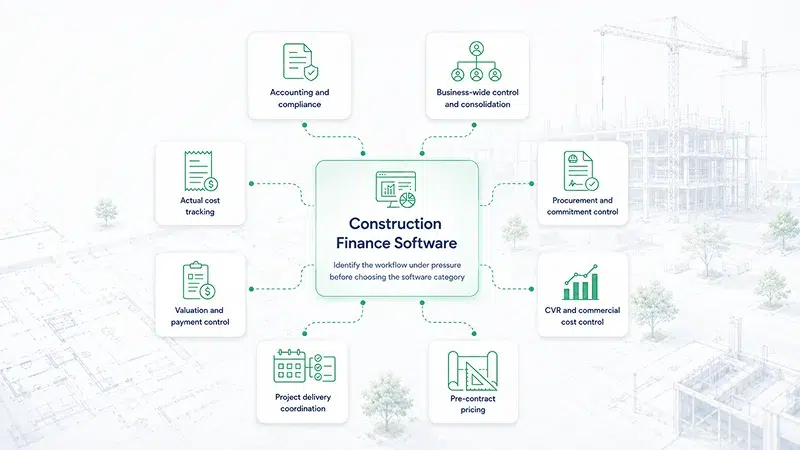
Before comparing vendors, name the workflow that is actually under pressure. A contractor may describe the problem as “we need better construction finance software,” but that can mean very different things in practice: closing accounts, tracking actuals, controlling commitments, managing applications for payment, or producing a reliable CVR. The diagnostic starts by separating those needs.
Use the shortlist below as a first filter:
- Statutory accounts, VAT, CIS, ledger, retention tracking → accounting and compliance
- Multi-entity consolidation, group reporting, full operational backbone → business-wide control and consolidation
- Allocating actual costs to projects, codes, or packages after the fact → actual cost tracking
- Controlling subcontract awards, purchase orders, supplier compliance → procurement and commitment control
- Applications for payment, valuations, payment notices, retention release → valuation and payment control
- Live CVRs, budget management, committed cost, variations, forecast final cost, margin movement → CVR and commercial cost control
- RFIs, drawings, programme, snagging, site coordination → project delivery coordination
- Tender pricing and quantity takeoff → pre-contract pricing
If the team can point to one of those rows and say “this is where the pain sits,” the buying conversation becomes much clearer. The harder cases are the ones where the pain has been hidden inside spreadsheets, manual reconciliation, or informal QS workarounds for so long that nobody has named the workflow clearly.
3.1 Common Workflow Misreads When Choosing Construction Finance Software
Buying decisions often go wrong when the visible symptom is mistaken for the underlying workflow problem:
| 1. Late CVRs are often mistaken for an accounting problem. | If the accounts are clean but the CVR still depends on manual QS inputs and spreadsheet reconciliation, the issue is usually commercial cost control, not statutory finance. |
| 2. Unclear subcontractor exposure is often mistaken for a purchase order problem. | Purchase orders help control commitments, but the commercial question is whether those commitments feed the package-level forecast and forecast final cost. |
| 3. Margin disagreement is often mistaken for a reporting problem. | If finance and commercial disagree every month, the issue is usually not the report format. It is the split between posted actuals, commitments, variations, and forecast assumptions. |
| 4. Payment disputes are often mistaken for a billing problem. | The applications for payment workflow is important, but disputes often come from weak valuation, variation, retention, or package budget control before the invoice stage. |
| 5. Delivery coordination issues are often mistaken for a finance problem. | If RFIs, drawings, programme updates, and site tasks are scattered, the issue is project delivery coordination. Financial control may be affected, but finance software is not the first fix. |
4. When Construction Cost Management Software is the Right Category
If the diagnostic points to commercial cost control, construction cost management software is the relevant category. The next challenge is that many vendors use similar language: live cost control, forecasting, CVRs, commitments, variations, and margin visibility. The useful test is whether the system can support the mechanics of subcontract-heavy commercial control in the way your team actually works.
The following questions will help you test workflow fit, not just feature coverage.
4.1 Can the System Show Budget, Committed Cost, Actual Cost, and Uncommitted Budget on the Same Cost Line?
A commercial team should not have to run separate reports to understand the package position. The system should show what was budgeted, what has been committed, what has hit actuals, and what remains uncommitted in one place. That uncommitted balance is often where future exposure becomes visible before the related invoices arrive.
4.2 Can Contracts and Budget Lines Work Many-to-Many?
Real package procurement is often many-to-many: one subcontract may draw from several WBS lines, and one WBS line may be split across several subcontracts. If the system forces a one-to-one relationship, it can distort package reporting and make the commercial team rebuild the true position outside the system.
4.3 Can the Team Explain Forecast Final Cost Line by Line?
The system should show how forecast final cost is produced at package or budget-line level: actuals, commitments, remaining exposure, variations, and manual forecast adjustments. The QS should be able to explain the number without needing a consultant or hidden configuration logic.
4.4 Do Variations Update the Live Commercial Position, or Sit in a Separate Log?
Variations should not only be recorded, they should affect the forecast where appropriate. The system should distinguish between instructed, submitted, approved, and forecast-only variations. If variations sit outside the cost position, they drift away from the CVR quickly.
4.5 Do Subcontractor Applications for Payment Update Package Position Correctly?
The system should handle applications for payment against package budgets for both lump sum and unit price contracts, and should show how each application changes the subcontract position, package budget, and remaining exposure. If an application does not affect the package position, it is only a payment workflow, not commercial cost control.
4.6 What Exactly Moves Between Cost Management and Accounting?
Integration claims vary widely. The buyer needs to know whether the system moves invoices, payments, nominal ledger postings, actuals, approved applications, or committed costs — and which data still requires manual reconciliation.
4.7 Can the Budget Evolve as the Project Moves Closer to Delivery?
Some projects need a budget that becomes more detailed over time, moving from early phases into delivery stages. The system should let the team upload, structure, lock, and refine budgets without losing the audit trail between stages. If each stage has to become a separate disconnected project, control becomes harder rather than clearer.
4.8 Can Contingency and Budget Reallocations be Managed Without Losing Traceability?
Commercial teams need to move budget between lines, manage contingency, and understand what has changed without rewriting history. The system should show where budget moved from, where it moved to, who changed it, and why. For phased projects or large schemes, contingency may also need to be managed at subproject, stage, or building level rather than as one blended pot.
4.9 Can External Partners Work Inside the Process with Controlled Access?
Many main contractors work with external QSs, consultants, designers, or delivery partners. If those inputs stay mainly in email, the workflow remains harder to control and audit. Role-based access and permissions matter because external partners should be able to contribute without seeing or changing more than they should.
4.10 Is the System Usable Enough That Teams Will Actually Work in It?
Flexibility and interface quality are not cosmetic. If commercial teams cannot copy and paste data easily, switch between contract and budget-line views, move quickly through common tasks, or understand the screen without heavy training, adoption will suffer. A clean, fast interface is part of adoption, not a nice-to-have.
Beyond accounting integration, some contractors need APIs, dashboards, or management reports built around their own project structure. The question is not whether integration exists in principle, but whether the data can move cleanly into the reporting layer the business actually uses.

5. When a Dedicated Cost Management Layer May be Unnecessary
Not every main contractor needs a dedicated construction cost management layer. If the commercial workload is simple, low-volume, and easy to reconcile, accounting software, job costing, and disciplined spreadsheets may be enough. That is more likely when:
- The business is not heavily subcontract-led
- The team only processes a few dozen purchase orders, invoices, or applications for payment each month
- Variations happen occasionally rather than regularly throughout the project
- Commitments are few enough to reconcile without a separate commercial control process
- Applications for payment are simple, low-volume, and easy to check against the budget
- The project team can see today’s cost position without chasing spreadsheets, emails, or disconnected reports
- The business can forecast cash flow and project margin for the next 6–12 months with confidence
- One QS or finance lead can maintain control without creating key-person risk
- External QSs, consultants, or partners do not need controlled access into the cost process
- Projects do not require staged budget progression, subprojects, or separate contingency control by phase, building, or package
If most of those statements are true, the contractor may not need a dedicated cost management layer yet.
But if most of them are not true, the problem is no longer just “better reporting.” It is commercial control at scale. Subcontract-heavy projects create too many moving parts: commitments, variations, applications for payment, reallocated budgets, contingency, cash flow, and forecast final cost. At that point, the question is not whether the team can keep working around the gaps. It is whether the current setup can still give a reliable live commercial position. That is where a dedicated cost management layer becomes relevant.
Conclusion: Run the Thirty-Minute Diagnostic
Most main contractors do not need six finance systems. They need to know which workflow is under pressure — accounts, actuals, commitments, applications for payment, or forecast margin — and evaluate software against that workflow first.
The short version of the diagnostic can be run with a commercial director and finance lead in the same room. Take the last three CVRs the business produced. For each one, ask: how long did it take to produce, which systems or spreadsheets did the data come from, where were commitments held, where were variations tracked, where were applications for payment reflected, and who held the master version together?
If the answer involves several disconnected sources, manual reconciliation, or one person holding the position together, the issue is not just reporting. It points to a commercial control workflow that is carrying too much outside the system. For subcontract-heavy main contractors, that can mean cost exposure is identified late, after commitments, variations, or applications for payment have already moved the margin.
UK main contractors do not necessarily lack options. They often lack clarity about which workflow each tool should own. The contractors that make the right choice identify the workflow that needs control, then choose the system that can own it.
Learn more about Bauwise construction cost management software — explore how NEWCOM Construction centralised cost and subcontractor management across it’s €75 Million portfolio, and other case study.
About the Author

Mikk Ilumaa
Mikk Ilumaa is the CEO of Bauwise, a leader in construction financial management software with over ten years of experience in the construction software industry. At the helm of Bauwise, Mikk leverages his extensive background in developing construction management solutions to drive innovation and efficiency. His commitment to enhancing the construction process through technology makes him a pivotal figure in the industry, guiding Bauwise toward setting new standards in construction financial management. View profile