
Xero is accounting software — for invoicing, bank reconciliation, VAT/CIS, payroll and financial reporting. Bauwise is construction cost management software — for cost control, budgets vs. actuals, subcontractor commitments, change orders (variations), and cash flow forecasting on live projects. They provide different cost control workflows. Many construction and development companies use Xero (and similar accounting tools) for their bookkeeping, and Bauwise as the centralized cost control layer when running multiple concurrent projects.
The page contains helpful information for main contractors, real estate developers and owners comparing Xero vs Bauwise and provides recommendation on when to use which tool.
Read also: Procore vs Bauwise: Construction Cost Management Compared
Table of Contents
What Each Tool Actually Does
| Xero | Bauwise | |
| Category & Core Job | Cloud accounting system of record — chart of accounts, bank feeds, financial statements | Construction-native cost management and commercial control software — procurement, commitments, cost forecasting |
| Built For | Small and mid-size businesses across any industry, run by finance/bookkeeping teams | Main contractors, real estate developers and owners running subcontract-driven projects — operated by commercial and project teams |
| Construction Project Costing Depth | Basic time and expense tracking via the Xero Projects add-on | Full budget-vs-actual cost control, purchase orders, subcontracts, retentions, contingency, risk management and live forecasting |
Bauwise extends commercial control, rather than replacing existing accounting and ERP tools. It sits between these systems — including Xero — and gives commercial teams the project-level cost control depth that general accounting and ERP software isn’t built to provide.
Read also: Sage vs Bauwise: Which Handles Construction Cost Control Better?
Xero vs Bauwise for Construction Commercial Control: Feature-by-Feature Comparison
| Feature | Xero | Bauwise |
| Bookkeeping, bank reconciliation, VAT/CIS | ✓ Full accounting system of record, HMRC certified | ✗ Not supported |
| Invoicing | ✓ Included — sales invoices and quotes to clients | ✓ Included — purchase invoices, with AI data extraction |
| Bank feeds, multi-currency, payroll | ✓ Included depending on plan | ✗ Not supported |
| Budget vs. actual cost tracking (job costing) | ✓ Available with Projects add-on’s basic tracking — time logs and expense against a project | ✓ Live budget, revised budget, commitment and forecast per cost code, rolling up to project and portfolio level |
| Tender management & procurement | ✗ Not supported | ✓ Dedicated tender management module with bid comparison. Tender award converts straight to a contract |
| Commitments management (purchase orders and subcontractor contracts) | ✓ Purchase orders — create, send, track and convert to bills, with role-based approval | ✓ Contracts and purchase orders tied to budget and cost codes, with retention and multi-step approvals |
| Change order / variation management | ✗ Not supported | ✓ Budget-level and commitment-level change orders, each logged with type, date and approval status |
| Applications for payment (progress billing) | ✗ Not supported — Xero’s Payments feature covers collecting payment on a finished invoice | ✓ Applications for payment for subcontractor claims and client-side payment applications |
| Cost-to-complete / forecast to completion | ✗ Not supported | ✓ Continuous cost forecast per subcontract and PO |
| Cash flow forecasting | ✓ Business-wide cash flow forecast supported up to 180 days on Xero’s Ultimate plan | ✓ Project-level cash flow tied to commitments and forecast |
| Portfolio overview (multi-project dashboard) | ✗ Not supported | ✓ Consolidated dashboard comparing budgets, costs and forecasts across all projects |
| Reporting | ✓ Included, not specific for construction cost reporting | ✓ Cross-project cost and commitment reporting |
| Subcontractor portal | ✗ Not supported | ✓ Free subcontractor portal available with Professional plan |
| Time and expense tracking | ✓ Basic, via Xero Projects add-on (Ultimate plan only) | ✓ Time sheets available |
When to Choose Xero, Bauwise, or Both?
- Choose Xero If — you need bookkeeping, invoicing, VAT/CIS returns and payroll, and you’re not managing subcontractors or committed costs — logging time and expenses per job to invoice against. Xero also handles CIS deductions and VAT domestic reverse charge natively, which covers UK construction compliance.
- Choose Bauwise If — you’re running multiple live construction or development projects with subcontractors doing most of the work, your team and outside parties — consultants, quantity surveyors, project managers — still manage budgets and costs in separate spreadsheets with manual reconciliation, and you need real-time visibility into cost exposure, budgets and margins as projects progress.
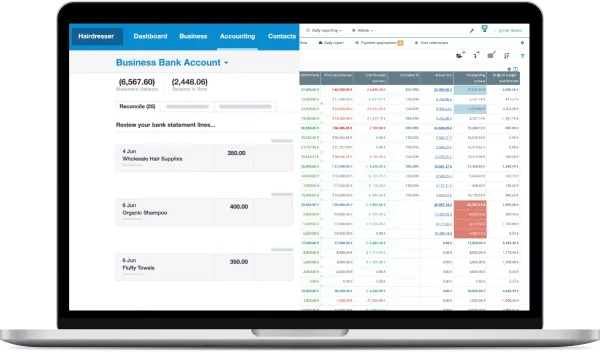
- Use Xero and Bauwise Together If — you need a centralized cost management layer that can work alongside Xero: budgets and invoices sync into Bauwise, approved invoices post back to Xero, and transactions, actuals and supplier data stay in sync between both systems — no double entry, no manual reconciliation.
How Xero to Bauwise Integration Works
Bauwise can be integrated with Xero, alongside other accounting and ERP systems (QuickBooks, Sage, Microsoft Dynamics 365 Business Central, Odoo, and others), so switching accounting software is never a requirement.
- Invoices land in Bauwise: invoices flow in from Xero or other sources, and Bauwise matches and codes each one to the right project, cost code, PO or contract before it goes to approval.
- Approved costs post back to Xero: once a cost is approved in Bauwise, it posts to Xero, coded and allocated — no re-typing, no duplicate entry.
- Actuals sync back: as transactions post in Xero, Bauwise records them as actuals, so commercial teams can see how actuals compare to the forecast as spending happens, not just at month-end.
Once connected, Xero keeps a clean, auditable ledger with only approved, coded costs posted to it, while Bauwise gives commercial teams a live view of budgets, commitments, forecast and actuals in one place.
Read also: Excel vs Bauwise: When Construction Cost Control Outgrows Spreadsheets
Pricing Xero vs Bauwise
Xero (UK Plans)
| Plan | Price (after intro offer) | Includes |
| Ignite | £16/month | Invoicing (20/month), bills (10/month), bank reconciliation, VAT returns to HMRC, CIS calculations |
| Grow | £37/month | Everything in Ignite, plus unlimited invoicing and bills, auto-reconciliation, expense claims (1 user) |
| Comprehensive | £50/month | Everything in Grow, plus multi-currency, payroll for 5 people, expense claims for 5 users |
| Ultimate | £65/month | Everything in Comprehensive, plus project tracking (10 users, +£5/user beyond that), payroll for 10 people, KPI benchmarking |
Bauwise
| Plan | From | Includes |
| Essential | €297/month + €19/user | Budget management, purchase orders & contracts, purchase invoice management, basic change orders, API |
| Advanced | €597/month + €19/user | Everything in Essential, plus advanced change orders, tender management, portfolio overview |
| Professional | €897/month + €19/user | Everything in Advanced, plus payment applications, subcontractor portal access, cash flow forecasting, reporting |
| Enterprise | Custom | Custom integrations for large organisations |
Xero and Bauwise cover different construction cost control workflows — pick the setup that actually fixes the commercial control problems your team has, not just the one with more features.
Frequently Asked Questions
Is Bauwise a Xero Alternative?
No. Bauwise is construction cost-control software, not accounting software, and can run alongside Xero — either standalone or integrated — as the commercial control layer for your projects.
Does Bauwise Integrate with Xero?
Yes. Bauwise can be connected to Xero to sync budgets and invoices into Bauwise, post approved costs back to Xero, and two-way sync transactions, actuals and supplier data between both systems without manual re-entry and reconciliation.
What Xero Projects cover construction companies cost control needs?
When it comes to construction cost control, Xero Projects covers basic time and expense tracking against a project, turning logged hours and costs into client invoices. Whether that’s enough depends on your commercial control complexity, portfolio size and workflows.
Can I Use Bauwise if I don’t Use Xero?
Yes. Bauwise works as a standalone commercial control layer to centralize construction cost management, including purchase invoice management. It works well for main contractors, real estate developers and owners running subcontractor-driven construction portfolios, CAPEX-heavy developments with multiple legal entities, and teams managing live project costs across multiple countries.
Does Bauwise handle VAT or CIS (Construction Industry Scheme)?
No. Bauwise focuses on project-side cost control — budgets, commitments, change orders and forecasting — and leaves statutory VAT and CIS compliance to accounting software like Xero (or your ERP of choice).
Is Xero or Bauwise Cheaper?
They’re not priced for the same job, so comparing Xero vs Bauwise on price alone isn’t quite right. Xero UK plans run £16–£65/month depending on tier. Bauwise starts at €297/month plus €19 per user, scaling by number of users, with unlimited projects included at every tier. Most construction companies running multiple projects budget for both, since they cover different parts of the job.
Page last reviewed: August 2026.